Goals
The tasks and ambitions that need time carved out for them.
Tiler builds your perfect timeline from three things: your goals, your appointments, and your location. Here's how onboarding gets you there.
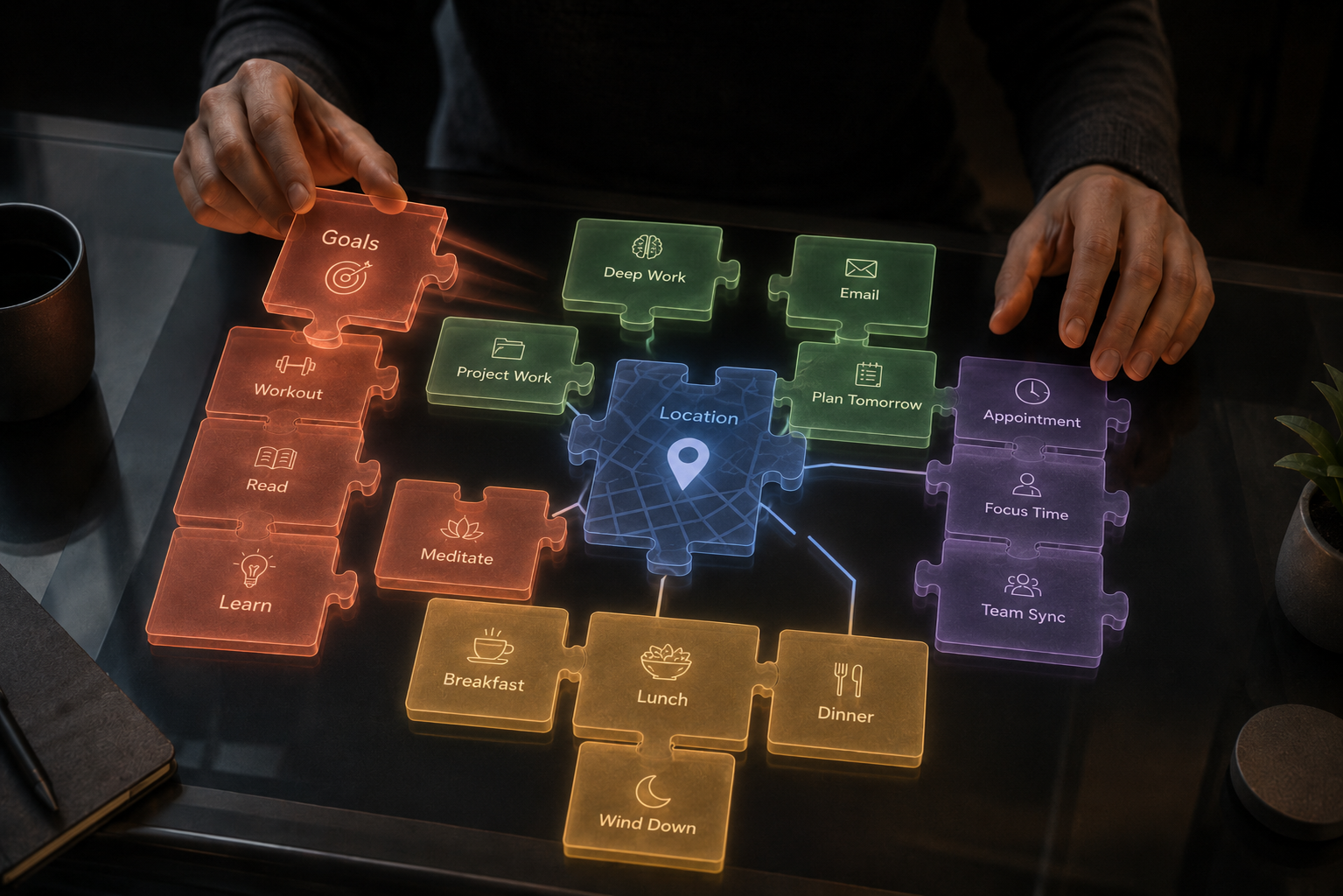
Most scheduling tools ask you to start from scratch, dragging blank boxes onto an empty grid and hoping the puzzle solves itself. Tiler works differently. Before you ever see a timeline, the app learns the shape of your day so it can build one that actually fits.
Onboarding takes about five minutes. By the end, Tiler's engine has enough context to generate a constraint-aware, location-anchored schedule that adapts as your week shifts. Three pillars drive everything:
The tasks and ambitions that need time carved out for them.
Meetings, flights, and commitments already locked in.
Where you actually are, so travel time is real, not guessed.

Everything starts with your Tiler account. Sign in and the app immediately begins building your profile memory! The contextual layer that the engine uses to understand how you work, when you're available, and what matters to you.

The first question is deceptively simple: when does your day begin? This single data point establishes the earliest boundary the engine will schedule around. Night owl or early riser, Tiler starts from your reality, not an arbitrary 9 AM default.
Why this matters: Every constraint in Tiler flows from your boundaries. Wake time, work hours, and location form the hard edges that the solver respects before optimizing anything else.
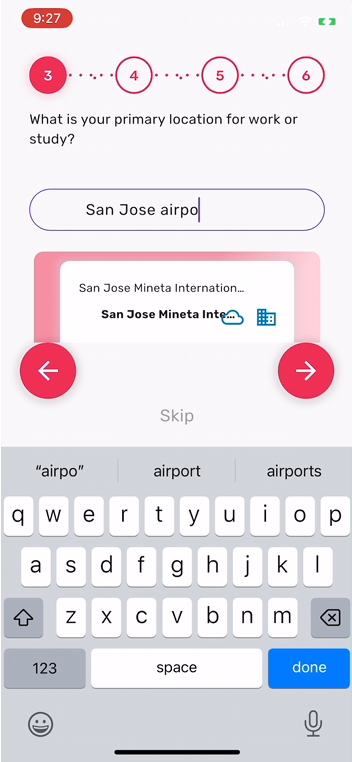
Where are you most of the day? Tiler integrates with Google Maps so travel time between tasks is real, calculated by driving, transit, or walking, and not a vague guess. This is the piece most planning tools skip entirely, and it's why their schedules crumble when you actually try to live them. The autocomplete pulls from Google's Places API, so you can enter anything from a corporate headquarters to a co-working space to a job site.
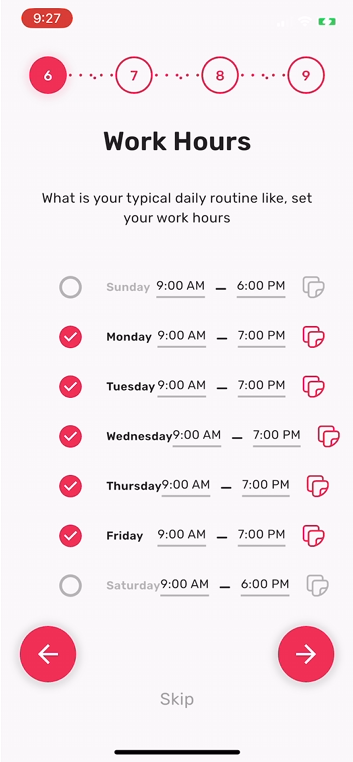
Not every day looks the same. Tiler lets you set work hours per day of the week: toggle days on and off, shift start and end times, and copy a schedule across multiple days. This creates the temporal fence that separates work blocks from personal time. The engine treats these as soft constraints, strong enough to shape your default schedule, flexible enough to bend when a deadline or travel commitment demands it.
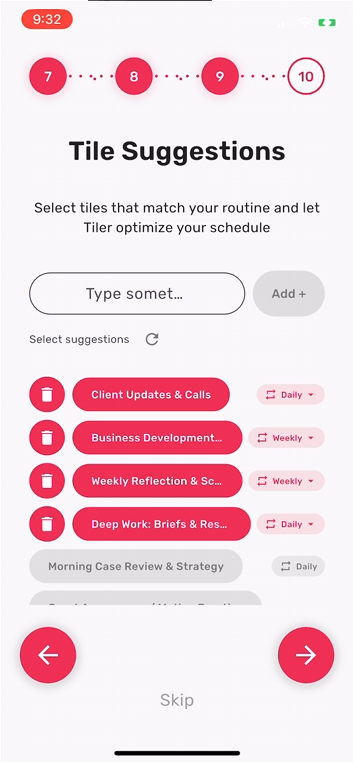
This is where Tiler begins to feel different. Based on your professional profile, the engine suggests recurring activity tiles (blocks of work) it thinks you'll need. Client calls. Deep work. Business development. Weekly reflection. You select the ones that match, delete the ones that don't, and set each to daily or weekly cadence.
AI-seeded, human-curated. The suggestions come from the LLM analyzing your professional context. You stay in control of what gets scheduled; the engine handles when and where.
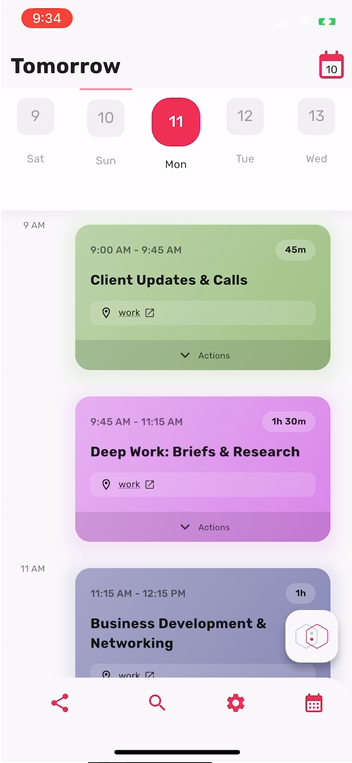
With your constraints loaded, the solver runs. What appears isn't a blank calendar waiting to be filled; it's an optimized timeline with your tiles placed where they fit, travel time accounted for, and work hours respected. Each tile is color-coded and linked to a location, with expandable action menus for quick edits. Add new tasks through natural language, run what-if scenarios to test alternatives, or share tiles with your team. The onboarding planted the seeds, and the engine grows the schedule from here.
Five minutes of setup. A schedule that actually works.
Get Started Free ?Available on iOS and Android. Free to start.
Tell us about yourself and what kind of schedule you need. We'll help you create a personalized schedule that fits your lifestyle.
Setting up your personalized profile...
Tell us about yourself and what kind of schedule you need. We'll help you create a personalized schedule that fits your lifestyle.
Setting up your personalized profile...
Tell us about yourself and what kind of schedule you need. We'll help you create a personalized schedule that fits your lifestyle.
Setting up your personalized profile...


'%3e%3cpath%20d='M6.13394%209.7H8.13394L8.93394%206.5H6.13394V4.9C6.13394%204.076%206.13394%203.3%207.73394%203.3H8.93394V0.612C8.67314%200.5776%207.68834%200.5%206.64834%200.5C4.47634%200.5%202.93394%201.8256%202.93394%204.26V6.5H0.533936V9.7H2.93394V16.5H6.13394V9.7Z'%20fill='%23B3B3B3'/%3e%3c/g%3e%3cdefs%3e%3cclipPath%20id='clip0_2046_4371'%3e%3crect%20width='8.8'%20height='16'%20fill='white'%20transform='translate(0.533447%200.5)'/%3e%3c/clipPath%3e%3c/defs%3e%3c/svg%3e)

'%3e%3cpath%20d='M8.36718%202.5C10.2691%202.5%2010.5064%202.507%2011.2526%202.542C11.9981%202.577%2012.5056%202.6939%2012.9522%202.8675C13.4142%203.0453%2013.8034%203.2861%2014.1926%203.6746C14.5485%204.02453%2014.824%204.44781%2014.9997%204.915C15.1726%205.3609%2015.2902%205.86909%2015.3252%206.61459C15.3581%207.36079%2015.3672%207.59809%2015.3672%209.50001C15.3672%2011.4019%2015.3602%2011.6392%2015.3252%2012.3854C15.2902%2013.1309%2015.1726%2013.6384%2014.9997%2014.085C14.8245%2014.5525%2014.5489%2014.9758%2014.1926%2015.3254C13.8426%2015.6812%2013.4193%2015.9566%2012.9522%2016.1325C12.5063%2016.3054%2011.9981%2016.423%2011.2526%2016.458C10.5064%2016.4909%2010.2691%2016.5%208.36718%2016.5C6.46528%2016.5%206.22798%2016.493%205.48178%2016.458C4.73628%2016.423%204.22879%2016.3054%203.78219%2016.1325C3.31482%2015.9572%202.89146%2015.6816%202.54179%2015.3254C2.18577%2014.9755%201.91034%2014.5523%201.73469%2014.085C1.56109%2013.6391%201.44419%2013.1309%201.40919%2012.3854C1.37629%2011.6392%201.36719%2011.4019%201.36719%209.50001C1.36719%207.59809%201.37419%207.36079%201.40919%206.61459C1.44419%205.86839%201.56109%205.3616%201.73469%204.915C1.90985%204.44752%202.18535%204.02412%202.54179%203.6746C2.89156%203.31846%203.31489%203.04301%203.78219%202.8675C4.22879%202.6939%204.73558%202.577%205.48178%202.542C6.22798%202.5091%206.46528%202.5%208.36718%202.5ZM8.36718%205.99999C7.43893%205.99999%206.54869%206.36875%205.89231%207.02512C5.23593%207.6815%204.86718%208.57174%204.86718%209.50001C4.86718%2010.4283%205.23593%2011.3185%205.89231%2011.9749C6.54869%2012.6312%207.43893%2013%208.36718%2013C9.29545%2013%2010.1857%2012.6312%2010.842%2011.9749C11.4984%2011.3185%2011.8672%2010.4283%2011.8672%209.50001C11.8672%208.57174%2011.4984%207.6815%2010.842%207.02512C10.1857%206.36875%209.29545%205.99999%208.36718%205.99999ZM12.9172%205.82499C12.9172%205.59293%2012.825%205.37037%2012.6609%205.20628C12.4968%205.04219%2012.2742%204.95%2012.0422%204.95C11.8101%204.95%2011.5875%205.04219%2011.4234%205.20628C11.2594%205.37037%2011.1672%205.59293%2011.1672%205.82499C11.1672%206.05706%2011.2594%206.27962%2011.4234%206.44372C11.5875%206.60781%2011.8101%206.69999%2012.0422%206.69999C12.2742%206.69999%2012.4968%206.60781%2012.6609%206.44372C12.825%206.27962%2012.9172%206.05706%2012.9172%205.82499ZM8.36718%207.39999C8.9241%207.39999%209.45827%207.62124%209.85209%208.01507C10.2459%208.4089%2010.4672%208.94304%2010.4672%209.50001C10.4672%2010.0569%2010.2459%2010.5911%209.85209%2010.9849C9.45827%2011.3787%208.9241%2011.6%208.36718%2011.6C7.81023%2011.6%207.27609%2011.3787%206.88226%2010.9849C6.48843%2010.5911%206.26718%2010.0569%206.26718%209.50001C6.26718%208.94304%206.48843%208.4089%206.88226%208.01507C7.27609%207.62124%207.81023%207.39999%208.36718%207.39999Z'%20fill='%23B3B3B3'/%3e%3c/g%3e%3cdefs%3e%3cclipPath%20id='clip0_2046_4377'%3e%3crect%20width='16'%20height='16'%20fill='white'%20transform='translate(0%200.5)'/%3e%3c/clipPath%3e%3c/defs%3e%3c/svg%3e)
'%3e%3cpath%20fill-rule='evenodd'%20clip-rule='evenodd'%20d='M14.8049%203.82775C15.1086%203.52401%2015.1086%203.03155%2014.8049%202.7278C14.5012%202.42407%2014.0087%202.42407%2013.705%202.7278L9.08116%207.35161L5.75649%202.81784C5.60997%202.61804%205.37703%202.5%205.12927%202.5H1.81049C1.5174%202.5%201.24919%202.66476%201.11671%202.92621C0.984228%203.18765%201.00996%203.50137%201.18328%203.73772L6.05357%2010.3792L1.26052%2015.1723C0.956781%2015.476%200.956781%2015.9685%201.26052%2016.2722C1.56426%2016.5759%202.05672%2016.5759%202.36047%2016.2722L6.98427%2011.6484L10.309%2016.1822C10.4555%2016.3819%2010.6884%2016.5%2010.9362%2016.5H14.2549C14.548%2016.5%2014.8163%2016.3353%2014.9487%2016.0738C15.0812%2015.8124%2015.0555%2015.4986%2014.8821%2015.2622L10.0118%208.6208L14.8049%203.82775ZM8.32073%208.94506C8.34476%208.98511%208.37268%209.02338%208.40457%209.05947L12.7201%2014.9444H11.3303L3.34534%204.05556H4.73514L8.32073%208.94506Z'%20fill='%23B3B3B3'/%3e%3c/g%3e%3cdefs%3e%3cclipPath%20id='clip0_2046_4380'%3e%3crect%20width='16'%20height='16'%20fill='white'%20transform='translate(0%200.5)'/%3e%3c/clipPath%3e%3c/defs%3e%3c/svg%3e)