Here’s Where Everything Lives
Explore the moments where your day finally makes sense. Find your way around the app. Find things to try in-app.
- When a meeting runs long, or a task gets deferred, Tiler doesn’t wait for you to fix it. It detects the shift and rebuilds your schedule around it, instantly. You set the intent. Tiler handles the rest.
- 🧩TilesAutoTile
Flexible tasks. Set a goal and duration — Tiler finds the slot, moves them as your day shifts, and sequences them intelligently.
📌BlocksLockedFixed commitments: meetings, flights, appointments. Tiler treats these as immovable anchors and schedules everything else around them.
🗺️RouteLocation-awareWhen tiles have locations, Tiler sequences them geographically, surfaces real transit options, and builds travel buffers between every stop.
👥TileShareTeam & FamilyAssign tiles to teammates or family. Everyone’s calendar adapts around shared commitments automatically. Context travels with the task.
- Google CalendarTilerYou schedule everything manuallyAI builds your schedule from plain EnglishNo awareness of travel timeAuto-calculates and adds travel buffersStatic — won’t adapt when things changeDetects ripples and reschedules instantlyNo navigation or route planningNavigate your day tile-to-tile with real transitShared calendars only — no task assignmentTileShare: assign and track tasks with anyoneNothing confirmed — events just appearConfirmation-first — you approve all changes
Create your account
Sign up with your email — free to start, no credit card needed.
Connect your calendar
Link Google or Outlook — Tiler reads your events and builds around them.
Set up your preferences
Choose your transit mode and set time limits in your profile.
Ready for Adaptive Scheduling
Your schedule is live — Tiler adapts automatically as your day changes.
Each step is an input to Tiler’s scheduling engine — your calendar tells it what’s fixed, your preferences tell it how you move, and your time limits tell it when you’re free. Together, they give Tiler the full picture it needs to run Adaptive Scheduling: a schedule that adjusts itself when things change.
- Connecting your calendar allows Tiler to see your real commitments. Once synced, incoming calendar events appear as blocks in your timeline. You can accept, edit, or resolve conflicts directly inside Tiler. When events change, Tiler adapts your tiles around them so your day stays balanced and realistic.

- Blocks represent fixed commitments, meetings, appointments, events, and things that must happen at a specific time. When you create or sync a block, Tiler treats it as non-negotiable and schedules your flexible work around it. Blocks don’t move unless you move them. This is how Tiler respects real-world commitments while still keeping your day workable.
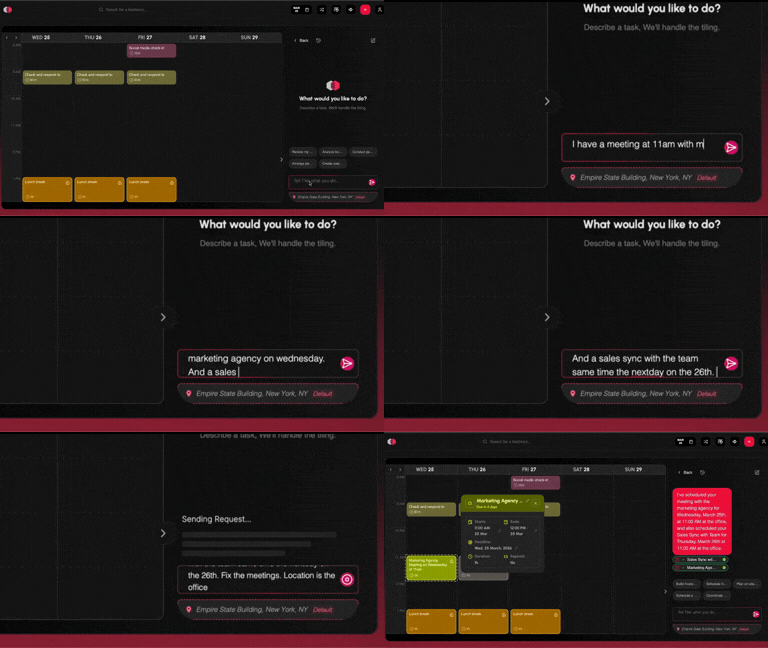
- Tiles are where Tiler becomes powerful. A tile represents something you need to do, without locking it to a rigid time. You set the intent, estimated duration, and optional deadline — Tiler handles placement. Tiles can move, adapt, and reshuffle as your day changes, making them ideal for real work, errands, habits, and focus sessions.
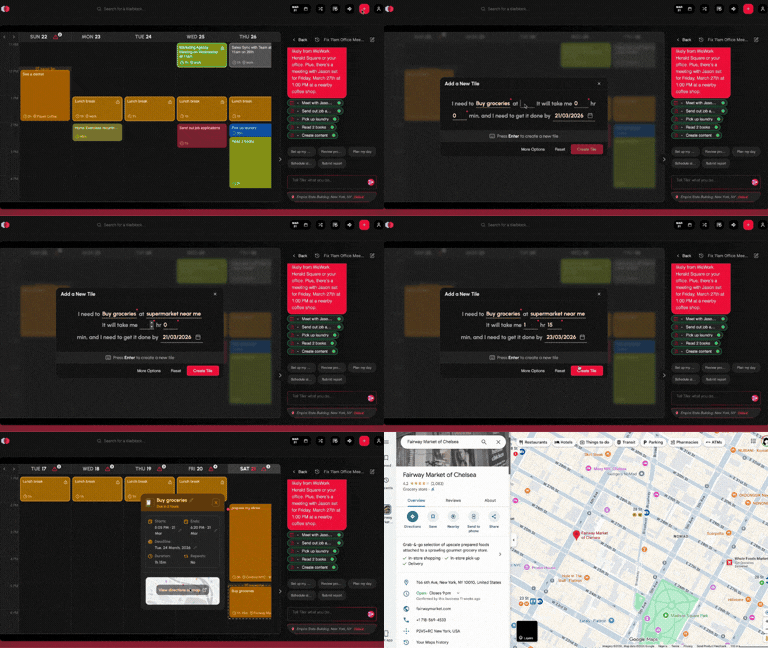
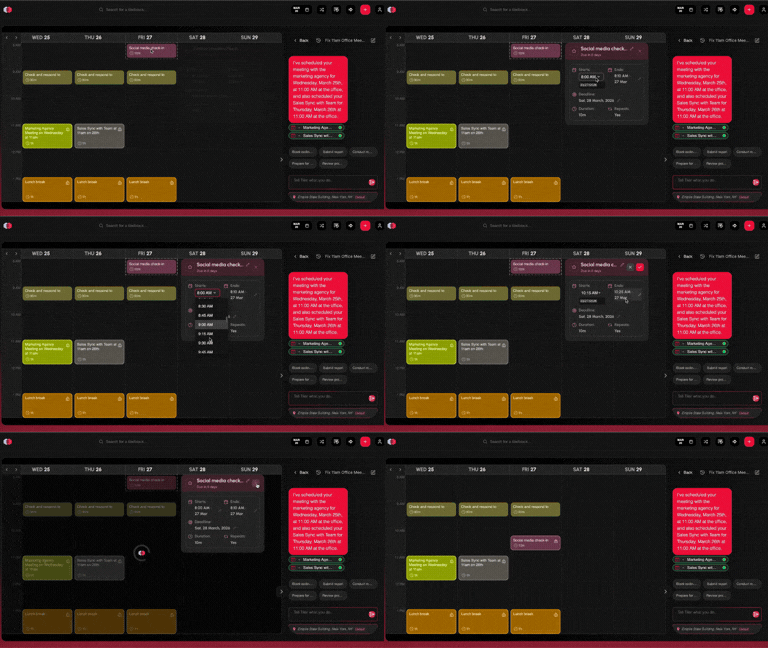
- Updating a tile is how you communicate change to the system. You can adjust its duration, defer it, change its deadline, or mark it complete. The moment you do, Tiler re-optimises your timeline to reflect the update. You don’t need to move other tasks manually, the system handles the ripple effects.
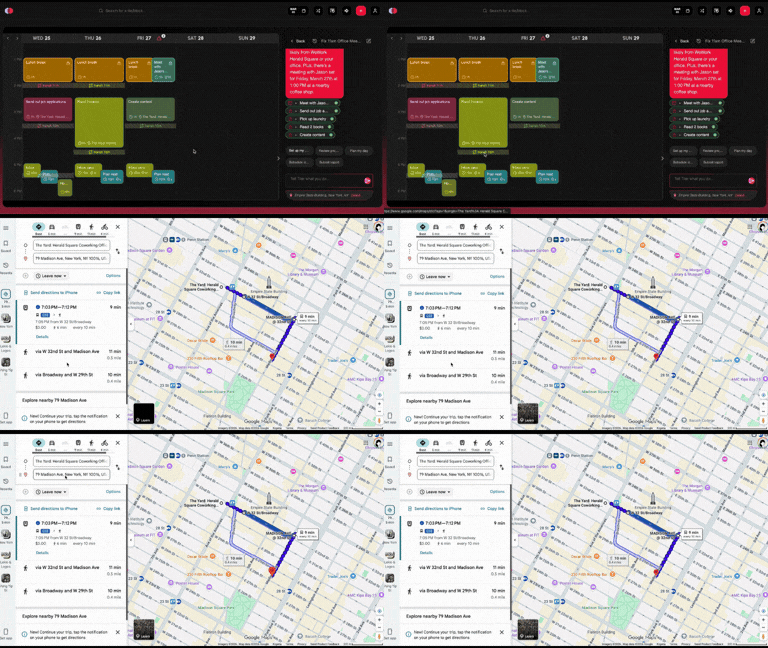
- Add a location to any tile and Tiler handles the rest. It auto-detects where you need to be and calculates real travel time between every stop on your day. That orange block sitting between your tiles isn’t a gap — it’s your journey, already planned. Tap it and your route opens: turn-by-turn directions loaded, time accounted for. Your schedule doesn’t just tell you what to do. It gets you there.
Adaptive Tiles
The core unit of Tiler. Each tile is a task, event, or habit with a duration — Tiler schedules them intelligently and moves them when your day changes.
Core featureAI scheduling assistant
Tiler asks clarifying questions, proposes the best available time, and builds a complete schedule including dependencies — always with your approval first.
Core featureChat scheduling
Tell Tiler what you need through a natural chat interface. It understands your intent and proposes a plan without you filling in a single form.
Core featureNatural language input
Describe tasks in plain English — no forms, no dropdowns. Tiler understands context, urgency, duration, and location from how you naturally talk.
Core featureAuto travel buffers
Tiler automatically inserts realistic travel time between location-based tiles based on your actual distance and transit options. Back-to-back never means late.
Unique to TilerAuto locations
Link locations to tiles once and Tiler remembers. Every time that task appears, travel time is calculated automatically from wherever you are.
Unique to TilerTime restrictions
Set the hours you’re available and Tiler only schedules within those bounds. Your personal time stays yours — no task bleeds into off-hours unless you allow it.
PreferencesAdaptive rescheduling
When a meeting runs long or a task gets missed, Tiler detects the ripple across your whole day and proposes fixes — instantly, with your approval before changing anything.
Core featureCalendar integration
Connect Google Calendar or Outlook. Tiler reads your existing events and schedules all new tiles around them — no double bookings, ever. Supports multiple calendars.
IntegrationCross-platform sync
Web, iOS, and Android all stay in real-time sync. Start a task on your laptop and check in on your phone without missing a beat. One schedule, everywhere.
PlatformHabit scheduling
Add recurring habits and Tiler auto-fits them around your day — keeping you consistent with your routines without you having to think about it each morning.
WellnessDefer & reschedule
Missed a tile? Tiler’s Defer feature instantly finds the next best slot and reschedules with one tap. Never lose a task — just push it forward intelligently.
Core featureSmart notifications
Get alerted when it’s time to leave for your next tile — with live transit updates if your route changes. Never miss a departure time because you lost track of the clock.
Real-timeTileShare
Share tiles with family or teammates. Assign who handles what. Track completion. Everyone’s calendar adapts around shared commitments automatically — no extra apps needed.
Collaboration

'%3e%3cpath%20d='M6.13394%209.7H8.13394L8.93394%206.5H6.13394V4.9C6.13394%204.076%206.13394%203.3%207.73394%203.3H8.93394V0.612C8.67314%200.5776%207.68834%200.5%206.64834%200.5C4.47634%200.5%202.93394%201.8256%202.93394%204.26V6.5H0.533936V9.7H2.93394V16.5H6.13394V9.7Z'%20fill='%23B3B3B3'/%3e%3c/g%3e%3cdefs%3e%3cclipPath%20id='clip0_2046_4371'%3e%3crect%20width='8.8'%20height='16'%20fill='white'%20transform='translate(0.533447%200.5)'/%3e%3c/clipPath%3e%3c/defs%3e%3c/svg%3e)

'%3e%3cpath%20d='M8.36718%202.5C10.2691%202.5%2010.5064%202.507%2011.2526%202.542C11.9981%202.577%2012.5056%202.6939%2012.9522%202.8675C13.4142%203.0453%2013.8034%203.2861%2014.1926%203.6746C14.5485%204.02453%2014.824%204.44781%2014.9997%204.915C15.1726%205.3609%2015.2902%205.86909%2015.3252%206.61459C15.3581%207.36079%2015.3672%207.59809%2015.3672%209.50001C15.3672%2011.4019%2015.3602%2011.6392%2015.3252%2012.3854C15.2902%2013.1309%2015.1726%2013.6384%2014.9997%2014.085C14.8245%2014.5525%2014.5489%2014.9758%2014.1926%2015.3254C13.8426%2015.6812%2013.4193%2015.9566%2012.9522%2016.1325C12.5063%2016.3054%2011.9981%2016.423%2011.2526%2016.458C10.5064%2016.4909%2010.2691%2016.5%208.36718%2016.5C6.46528%2016.5%206.22798%2016.493%205.48178%2016.458C4.73628%2016.423%204.22879%2016.3054%203.78219%2016.1325C3.31482%2015.9572%202.89146%2015.6816%202.54179%2015.3254C2.18577%2014.9755%201.91034%2014.5523%201.73469%2014.085C1.56109%2013.6391%201.44419%2013.1309%201.40919%2012.3854C1.37629%2011.6392%201.36719%2011.4019%201.36719%209.50001C1.36719%207.59809%201.37419%207.36079%201.40919%206.61459C1.44419%205.86839%201.56109%205.3616%201.73469%204.915C1.90985%204.44752%202.18535%204.02412%202.54179%203.6746C2.89156%203.31846%203.31489%203.04301%203.78219%202.8675C4.22879%202.6939%204.73558%202.577%205.48178%202.542C6.22798%202.5091%206.46528%202.5%208.36718%202.5ZM8.36718%205.99999C7.43893%205.99999%206.54869%206.36875%205.89231%207.02512C5.23593%207.6815%204.86718%208.57174%204.86718%209.50001C4.86718%2010.4283%205.23593%2011.3185%205.89231%2011.9749C6.54869%2012.6312%207.43893%2013%208.36718%2013C9.29545%2013%2010.1857%2012.6312%2010.842%2011.9749C11.4984%2011.3185%2011.8672%2010.4283%2011.8672%209.50001C11.8672%208.57174%2011.4984%207.6815%2010.842%207.02512C10.1857%206.36875%209.29545%205.99999%208.36718%205.99999ZM12.9172%205.82499C12.9172%205.59293%2012.825%205.37037%2012.6609%205.20628C12.4968%205.04219%2012.2742%204.95%2012.0422%204.95C11.8101%204.95%2011.5875%205.04219%2011.4234%205.20628C11.2594%205.37037%2011.1672%205.59293%2011.1672%205.82499C11.1672%206.05706%2011.2594%206.27962%2011.4234%206.44372C11.5875%206.60781%2011.8101%206.69999%2012.0422%206.69999C12.2742%206.69999%2012.4968%206.60781%2012.6609%206.44372C12.825%206.27962%2012.9172%206.05706%2012.9172%205.82499ZM8.36718%207.39999C8.9241%207.39999%209.45827%207.62124%209.85209%208.01507C10.2459%208.4089%2010.4672%208.94304%2010.4672%209.50001C10.4672%2010.0569%2010.2459%2010.5911%209.85209%2010.9849C9.45827%2011.3787%208.9241%2011.6%208.36718%2011.6C7.81023%2011.6%207.27609%2011.3787%206.88226%2010.9849C6.48843%2010.5911%206.26718%2010.0569%206.26718%209.50001C6.26718%208.94304%206.48843%208.4089%206.88226%208.01507C7.27609%207.62124%207.81023%207.39999%208.36718%207.39999Z'%20fill='%23B3B3B3'/%3e%3c/g%3e%3cdefs%3e%3cclipPath%20id='clip0_2046_4377'%3e%3crect%20width='16'%20height='16'%20fill='white'%20transform='translate(0%200.5)'/%3e%3c/clipPath%3e%3c/defs%3e%3c/svg%3e)
'%3e%3cpath%20fill-rule='evenodd'%20clip-rule='evenodd'%20d='M14.8049%203.82775C15.1086%203.52401%2015.1086%203.03155%2014.8049%202.7278C14.5012%202.42407%2014.0087%202.42407%2013.705%202.7278L9.08116%207.35161L5.75649%202.81784C5.60997%202.61804%205.37703%202.5%205.12927%202.5H1.81049C1.5174%202.5%201.24919%202.66476%201.11671%202.92621C0.984228%203.18765%201.00996%203.50137%201.18328%203.73772L6.05357%2010.3792L1.26052%2015.1723C0.956781%2015.476%200.956781%2015.9685%201.26052%2016.2722C1.56426%2016.5759%202.05672%2016.5759%202.36047%2016.2722L6.98427%2011.6484L10.309%2016.1822C10.4555%2016.3819%2010.6884%2016.5%2010.9362%2016.5H14.2549C14.548%2016.5%2014.8163%2016.3353%2014.9487%2016.0738C15.0812%2015.8124%2015.0555%2015.4986%2014.8821%2015.2622L10.0118%208.6208L14.8049%203.82775ZM8.32073%208.94506C8.34476%208.98511%208.37268%209.02338%208.40457%209.05947L12.7201%2014.9444H11.3303L3.34534%204.05556H4.73514L8.32073%208.94506Z'%20fill='%23B3B3B3'/%3e%3c/g%3e%3cdefs%3e%3cclipPath%20id='clip0_2046_4380'%3e%3crect%20width='16'%20height='16'%20fill='white'%20transform='translate(0%200.5)'/%3e%3c/clipPath%3e%3c/defs%3e%3c/svg%3e)